

Viktor Review (2026): Is This AI Coworker Worth It? PROMO CODE: KNOCKED-UP50oFF

Product Review
Every few months a vendor promises me an AI employee, and every few months I discover that what they actually sold me was an intern who has read the entire internet but cannot find the shared drive. So, when Viktor showed up calling itself an AI coworker that lives inside Slack and actually finishes the work, my recovering-insider reflex was to reach for the saltshaker before I reached for my credit card.
As a parent, I am sure you could use all the help you can get and since this being a financial-well-being blog - this tool should be considered.
Heads up: some links below are affiliate links. If you buy through them, I may earn a small commission at no extra cost to you. I only recommend things I'd tell a friend to buy anyway.
Quick verdict: Viktor is one of the few AI tools in 2026 that behaves less like a chatbot waiting for instructions and more like a teammate who reads the room, volunteers for work, and hands back something finished. It is genuinely useful for lean teams and solo operators who already run their business out of Slack or Teams, provided you treat the credit meter the way you would treat a teenager holding your car keys. You can get $50 off your first purchase. No credit card required and use promo code KNOCKED-UP50OFF if you decide to stay.
What Viktor Actually Does
Viktor is an AI agent that joins your Slack or Microsoft Teams workspace as a single shared coworker, which means the whole team @mentions the same Viktor in channels and DMs instead of everyone buying their own private assistant. It launched publicly in February 2026, comes out of a Warsaw and Munich startup that raised a $75M Series A led by Accel, and has since added Discord and a web app for people who insist on leaving the chat window.
The important distinction is that Viktor is built to execute rather than advise. It runs on its own cloud computer, so it can browse the web, pull data from your connected tools, write and run code, and return a finished spreadsheet, PDF, dashboard, or pull request instead of a polite paragraph explaining how you might do it yourself. Viktor says it connects to more than 3,200 tools through managed sign-ins, and by default it runs on Anthropic's Claude Opus model under the hood, which is a bit like discovering the new hire you poached actually trained at the firm down the street.
It also keeps a shared memory of how your business works, so when you correct it once about how you format the weekly report, it is supposed to remember that correction across the workspace. Viktor will even read your channels shortly after installation and come back with a list of tasks it thinks it could take off your plate, which is either delightfully proactive or mildly unsettling depending on what your team has been saying in general.
Real Use Cases (Not the Keynote Versions)
The demos always show an AI booking a moon landing, but the places Viktor earns its keep are the boring, recurring chores that quietly eat a small team alive.
Marketing spend audits. You can type "@Viktor audit our Meta Ads and Google Ads spend" and get back an analysis of where the money went, which is the kind of request that used to sit in someone's inbox until the quarterly review forced a confession.
Cross-tool busywork. Viktor's own examples include pulling numbers from Stripe, updating a Notion dashboard, and filing the follow-up ticket in Linear in one pass, which replaces the ancient ritual of three tabs, two copy-pastes, and one forgotten step.
Scheduled reports and check-ins. You can set recurring tasks that run on a schedule, so the Monday metrics summary appears in the channel without anyone having to remember that it is Monday.
Agency and client work. Several reviewers describe a channel-per-client setup where each Slack channel gets its own integrations and Viktor works inside it like a team member who already knows the account.
First responder on code. Because it can read a codebase, run code, and open a pull request, Viktor can take the first look when something breaks, provided you have given it the permissions to do so.
Research and vendor comparisons. Hand it a question like which of seven software vendors is cheapest for your use, and it will do the legwork and return a summary with the math attached.
Picture Bernadette, who runs a six-person consulting shop and spends every Friday afternoon assembling a client status report from four different systems while pretending she enjoys it. Viktor is built for exactly that Friday, and the honest pitch is not that it replaces Bernadette but that it gives her Friday back so she can do the work clients actually pay her for.
Viktor Pricing (and the Meter Nobody Mentions at the Demo)
Viktor charges per workspace rather than per seat, which is a refreshing change from the usual model where you pay full price for the colleague who logs in twice a year to change his profile photo. Everything runs on credits, and Viktor publishes the rate plainly on its pricing page: $2.50 per 1,000 credits on every self-serve plan.
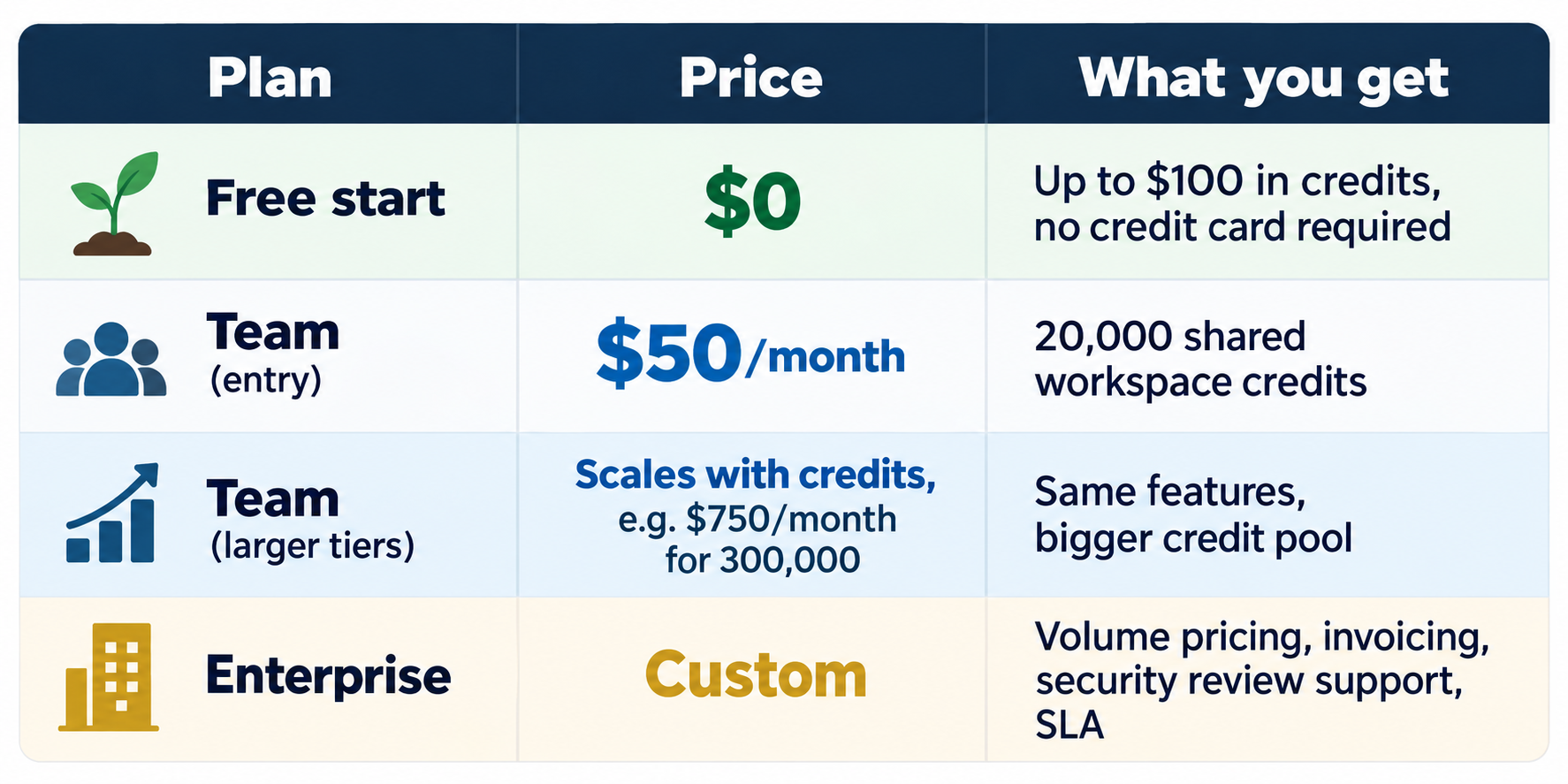
Every plan includes every integration and capability, so the only real decision is how many credits you buy. As a rough guide, Viktor's own estimates put a quick Slack question at about 50 to 100 credits, a complex workflow at 500 to 1,500 credits, and a full project at 2,000 to 5,000 credits, which means the $50 tier is a tasting menu rather than an all-you-can-eat buffet.
Unused plan credits roll over for one month, and the free starter credits do not expire, which is generous. Top-up credits cost more per credit than your plan rate, so if you find yourself topping up every month, the meter is politely telling you to move to a bigger plan.
The deal: Start with the Promo code KNOCKED-UP50OFF and apply it at checkout. You’ll get $50 off using our promo code above. Prices as of October 2026; check Viktor's pricing page for the current numbers.
Strengths
It takes initiative. The most common praise in early user reviews is that Viktor volunteers ideas and spots work worth doing, which is more than can be said for several humans I have managed.
It finishes things. You get back a document, a dashboard, a ticket, or a pull request, not a motivational speech about how you could build one yourself.
It lives where the work already happens. There is no new app to adopt and no change-management campaign with a mascot, because your team simply @mentions Viktor in the channels they already use.
No per-seat tax. The occasional user costs nothing until they actually ask Viktor to do something, which flips the usual SaaS math in your favor.
Sensible guardrails. You can limit Viktor to specific channels, set integrations to read-only, and require approval before sensitive actions, and that approval step is on by default. Viktor also says it does not train its models on your data.
Limitations
The credit meter is hard to forecast. Reviewers consistently praise the work and wince at the bill, and one widely shared Reddit account described a five-person team burning through its credits in about 36 hours, so set a spend cap on top-ups before you hand Viktor anything recurring.
It still needs a supervisor. Users report that it occasionally forgets context or glosses over an assumption that matters, which means bigger deliverables need a human review before they go to a client or a board.
It can be wordy. Ask a yes-or-no question and you may receive five paragraphs, which is charming in a new hire for about a week.
Shared access cuts both ways. When one teammate connects a tool, the whole workspace can inherit that access, and at least one customer reportedly shared a personal Gmail inbox with the entire team this way. Viktor has since added the ability to mark a connection as personal, so use it.
Compliance is still maturing. As of late summer 2026, Viktor held SOC 2 Type I, with Type II and ISO 27001 reported as in progress, so regulated companies should ask for the current status before rollout.
Autonomy has a personality. In one internal incident reported around its funding round, Viktor reacted to a layoff announcement with a skull emoji in a public channel, which is either a bug or the most honest damn employee the company ever had. Either way, you will want to keep it well clear of the HR announcements channel until it learns some bedside manner.
Alternatives Worth Knowing
Viktor is entering a crowded room, and an honest review should tell you who else is standing in it, even if the punch bowl is the same brand.
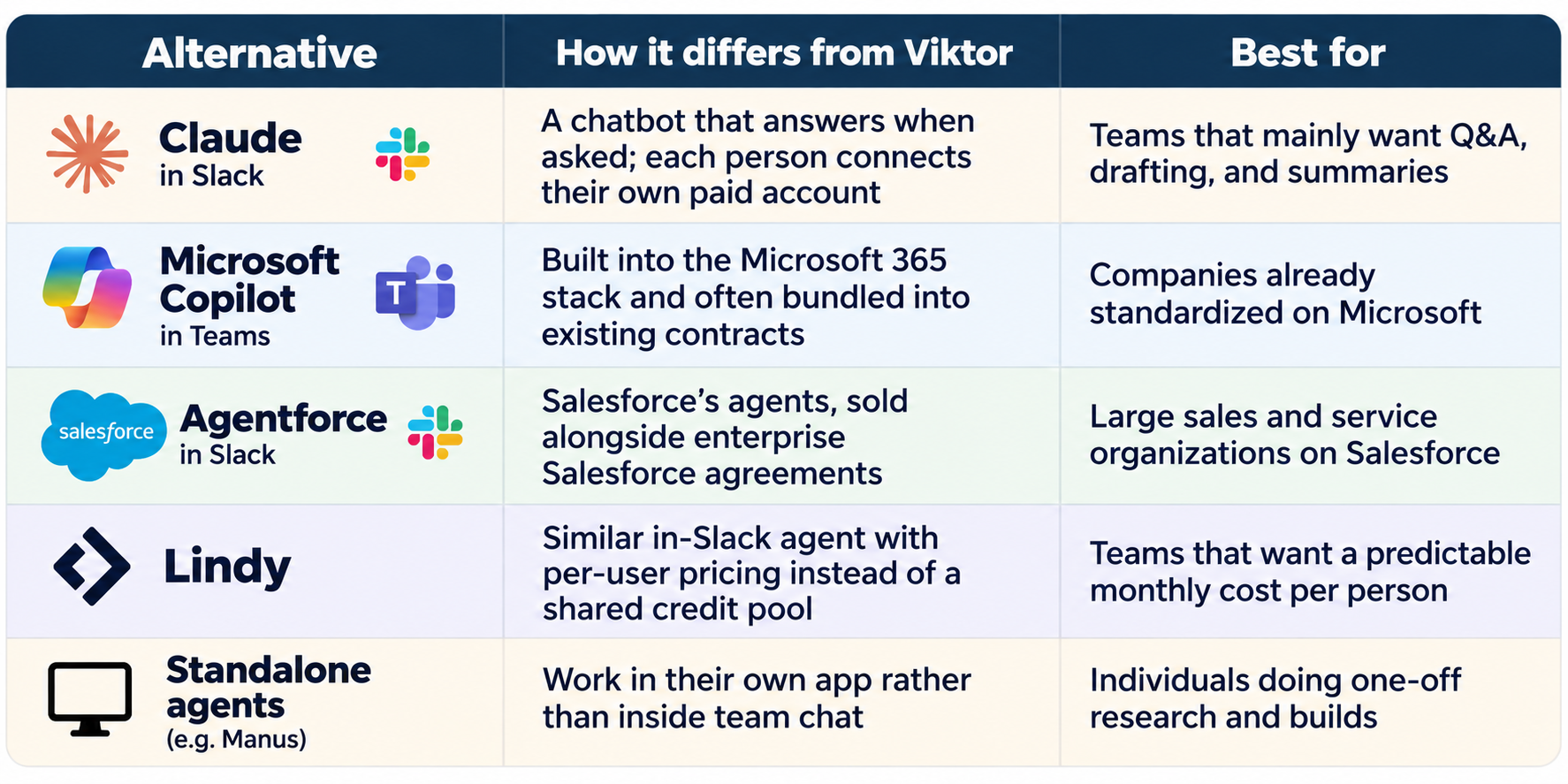
The short version is that the big-platform options win on bundling and procurement convenience, while Viktor wins on being one shared, proactive coworker that a small team can install this afternoon without a purchase order or a steering committee.
Who Should Use Viktor (and Who Should Walk Past It)
Viktor is a strong fit if you are a solo operator, side hustler, agency owner, or small team that already runs the business inside Slack or Teams, your work is varied and light to medium in weight, and you would otherwise be hiring someone mostly to move information between systems and assemble reports.
Skip it, or at least wait, if your workload is heavy and repetitive enough that a usage meter will spin like a slot machine, you need a fixed per-person cost your finance team can predict to the penny, or your security team requires finalized certifications before anything touches company data.
Consider Rafael, a manager who signs up for every AI tool in hopes that one of them will finally do his thinking for him. Viktor will not save Rafael, because the people who get the most from it are the ones who already know exactly what good work looks like and simply want more hours to do it.
The Knocked Up Money Bottom Line
An AI coworker will not magically turn a side hustle into a second salary, but for a parent with more ideas than hours, buying back even two or three hours a week can be the difference between a business that grows and one that quietly stalls. Here is how to test Viktor without risking your grocery budget.
Write down the three money chores you dread most, such as bookkeeping, invoicing, or order tracking, because a tool you test on imaginary problems will always look brilliant and always disappoint.
Set guardrails on day one by connecting only the tools Viktor needs, marking personal accounts as personal, and leaving the approval step switched on.
Do the family-budget math by comparing the plan price to the hours you got back and what those hours are worth to your business, and if the numbers work, lock in with promo code KNOCKED-UP50OFF.
If you are also thinking about starting a newsletter for your side business, our Beehiiv promo code page shows how to launch one for less, and the two tools work well together once your audience starts to grow.
The goal was never to own the cleverest AI on the block, because the goal is to buy back your time and spend it on the things that actually build your family's financial future.